
Two keystrokes to anything on your Mac.
Jump Valet builds its own index of your apps and folders and keeps it in memory, so the panel answers while you are still typing. It answers when Spotlight is rebuilding, and it answers the same way every time.
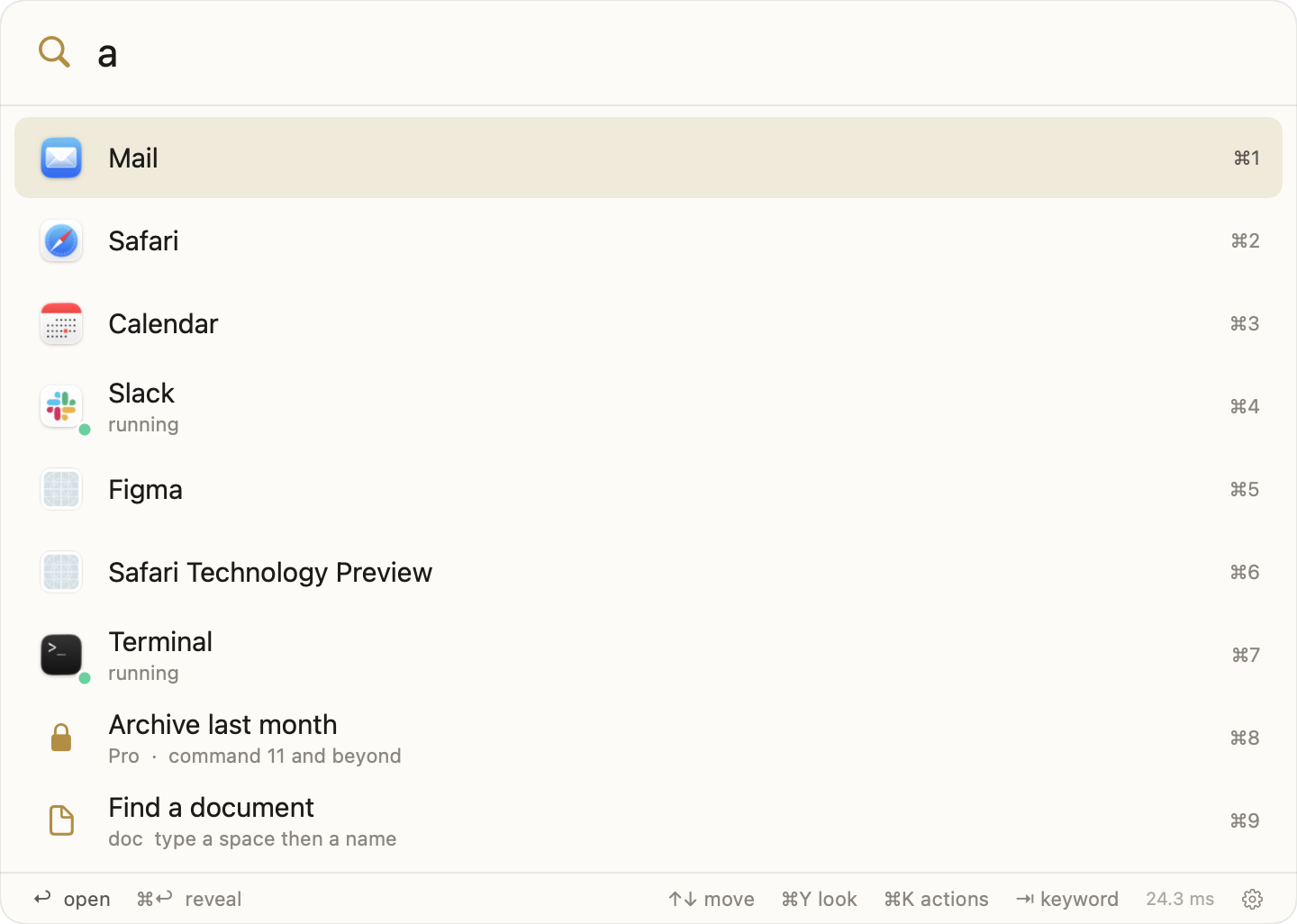
⌘Spacethen the first few letters
The panel filtering as the letters land, at the speed it runs.
Measured with launcherapp --bench on a MacBook Air (M5), 253 applications and 116,211 indexed items, on 9 September 2026. Run the same command on your own Mac and compare.
The problem
A launcher that sometimes finds things is worse than a slow one.
You press the key, type three letters, and the app you use every day is not in the list. So you look at the results, decide they are wrong, and go to the Dock. That half second of doubt is the whole cost, and it happens because most launchers do not own their own answer.
Borrowed search
A launcher that asks Spotlight for its results inherits Spotlight's bad days. Turn the index off, or catch it rebuilding after an update, and the launcher has nothing to show.
A crowded disk
Years of installs leave thousands of app bundles registered on a Mac, most of them helpers and frameworks nobody launches. Ranking against all of them puts the wrong row first.
A hotkey that stops answering
Secure Input is the macOS mode a password field turns on. Anything watching the keyboard through an event tap can stop receiving keys while it is on, and the launcher simply does not open.
Beat one of three
Open an app before you finish its name.
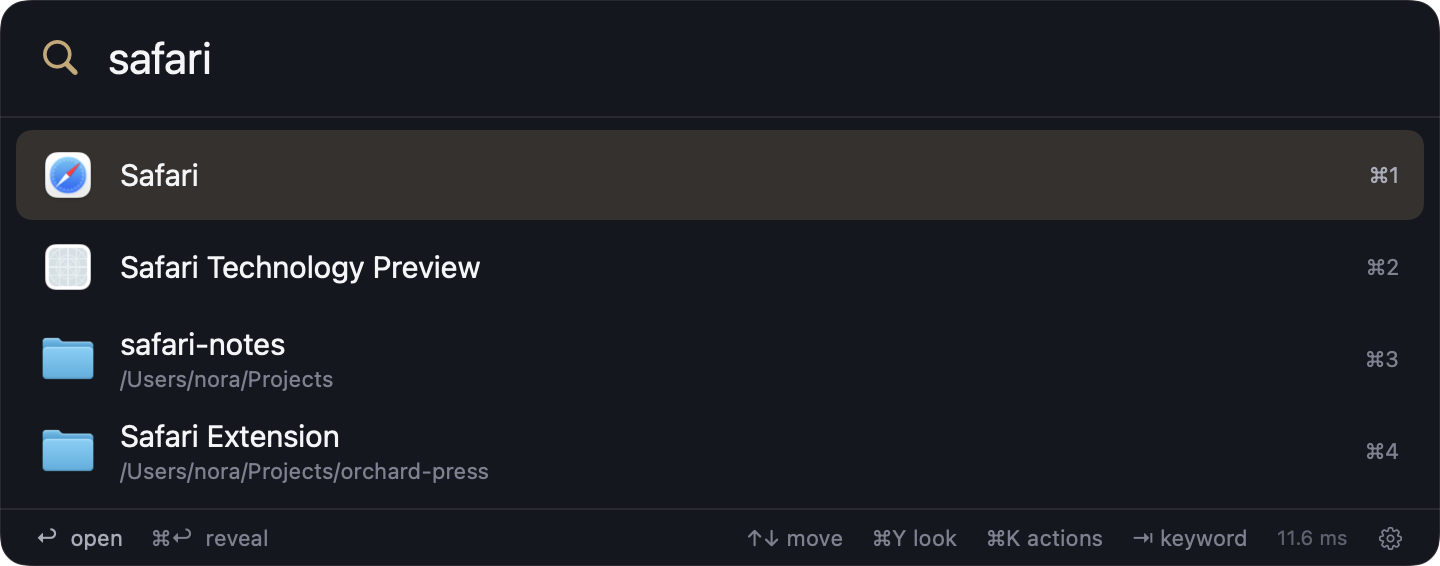
Jump Valet reads application bundles off the disk itself and holds a catalog in memory. Exact match beats prefix, prefix beats initials, initials beat a fuzzy hit, and the app you actually launch climbs. Type saf and Safari is first, every time, in the same place.
Beat two of three
Jump to a folder without opening a window to get there.
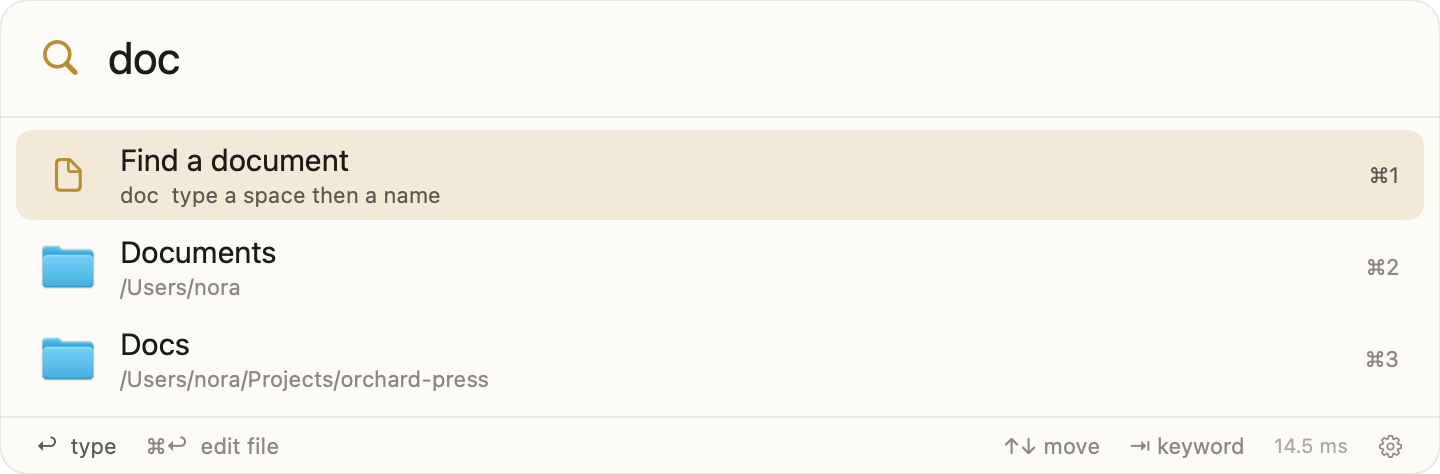
Jump Valet keeps a folder index of the places you actually work, and you choose them. Point it at a source tree and it indexes directories only, because a repository holds a hundred thousand files and none of them is what you are jumping to. Point it at Documents and it takes the files too.
Beat three of three
Your automations live in one file that belongs to you.
Commands are rows in a single JSON file at ~/Library/Application Support/Jump Valet/commands.json. Open links, run shell or AppleScript, search a site by keyword, act on the system, or take an argument after a space. Save the file and the panel has it: Jump Valet watches the folder and also polls the file, so an edit made in place is picked up the same second.
It reads your Alfred workflows
Point Jump Valet at your Alfred preferences and it converts what it finds into commands you own. On the author's own machine it converted 38 of 40. The two it left are script filters, and it says so rather than importing something that would not run.
Any command can have its own key
Give a command a chord and it works without opening the panel at all. Write cmd+shift+c or paste the symbols; both parse.
How it works
It owns every part of the answer.
Its own catalog
Application bundles are read from disk and ranked in memory. Nothing is asked of Spotlight, so nothing is lost when Spotlight is busy, disabled or rebuilding.
Its own folder index
You name the roots. Source trees are indexed folders-only; document folders take files to a depth you set.
A hotkey that survives
The panel is bound through Carbon's hot key API rather than a keyboard event tap, which is why a password field being focused does not take the key away.
- Answers, in the panel. Arithmetic, percentages, unit conversions and currency, converted in place. Exchange rates are fetched once and cached for twelve hours.
- Quick Look, on the row. Press the look key on any file or folder and see it without leaving the panel.
- An empty panel that is yours to choose. Nothing at all, your running apps in most-recent order, or the things you open most.
- Five skins, light and dark, following the system. Ink and gold and Paper are free; Reach violet, Graphite and Linen come with Pro.
- A doctor that names the real problem. It checks the hotkey, the index, Accessibility, and whether Spotlight still holds the key combination you asked for.
Speed, measured
The number that matters is the one between the letter and the row.
Every launcher claims to be fast, so here is the method behind the number. launcherapp --bench <query> ships inside the app. It waits for the index to settle, runs the same query seven times against the live catalog, and prints the median, the best, and the size of the corpus it searched. These are its numbers on the machine this was built on.
| Command | What it is doing | Median | Best of seven |
|---|---|---|---|
--bench safari | Ranking an application name against the whole catalog and index | 3.03 ms | 2.73 ms |
--bench doc | A short query matching applications, folders and a keyword command at once | 5.66 ms | 5.42 ms |
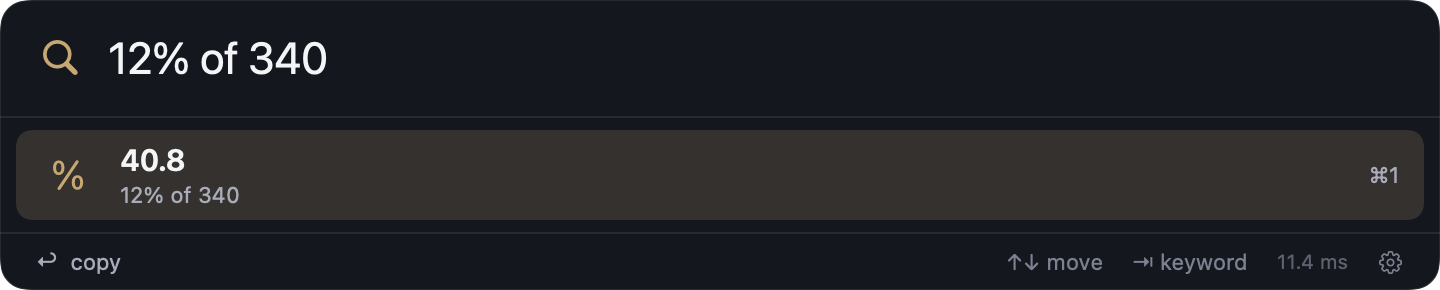
--bench "12% of 340" | Parsing and evaluating an expression, which is real work and not a lookup | 3.35 ms | 3.06 ms |
Two things make those numbers possible and neither is clever. The catalog and the index live in memory, so a query is a comparison over an array, never a request to another process that may be busy. And the panel is built at launch and hidden, not constructed when you press the key, so the first press of the day is as quick as the fiftieth.
The third number used to be the interesting one. Arithmetic was fourteen times slower than finding an app, because the answer engine parses what you wrote instead of matching it. That parser was rewritten, and it now answers in about the same time as a name search. All three numbers come from the same command, on the same machine, on the same day, including whichever one happens to be least flattering.
Answers
Type the question where you were already typing.
Most of the arithmetic a person does in a day is one line long and does not deserve an application. Jump Valet answers it in the panel: arithmetic, percentages of a number, unit conversions, dates, currency, and numbers written as words. Press return and the answer is on your clipboard.
- Currency without a round trip. Rates come from a public exchange-rate service once and are cached for twelve hours, so a conversion answers instantly and keeps answering on a plane.
- Units in the words you would say. Miles to kilometres, pounds to kilograms, fahrenheit to celsius, gigabytes to megabytes, written the way you would write them in a message.
- It stays out of the way. The answer row appears when what you typed is unambiguously a calculation, so typing an app name that happens to contain a digit does not push your app down the list.
Coming from Alfred
Bring the workflows you already built.
The reason people stay on a launcher they have stopped enjoying is the automations. Years of workflows are real work, and starting again is a cost nobody wants to pay to try something. So Jump Valet reads your Alfred preferences directly and converts what it finds into its own commands.
What converts
Workflows built from the pieces a launcher actually runs: opening URLs, running shell and AppleScript, launching applications, keyword searches with an argument, and system actions. Each becomes a row in your command file with its keyword and its hotkey intact.
What it tells you instead
Script filters, which ask a script for a live list of results as you type, are a different shape and are not converted. The import names them, so you never end up with a command that fails without saying why. On the author's own preferences, 38 of 40 workflows converted and the two skipped were both script filters.
Nothing about your Alfred setup is changed or removed by the import. It reads; it does not write. You can run both launchers side by side for as long as you like, on different keys, and decide later. Jump Valet takes Option-Space by default precisely so that decision stays yours: there is a button in Settings that quits Alfred and takes Command-Space, and it is the only thing that ever does.
The moments
What it actually replaces, hour by hour.
The application you use forty times a day
Two letters and return. The one you open most climbs to the top on its own, because launching something is the vote that decides the ranking.
The project folder four levels down
Type the folder name, not the path. Or type the parent and walk in with the right arrow when you cannot remember which of three similar names it was.
The thing you copied ten minutes ago
Clipboard history holds 500 items with pinning, searchable in the same panel. Copies that a password manager marks concealed are never recorded at all.
The site you search constantly
Give it a keyword. Type the keyword, a space, and your words, and you land in the results, one step past the home page.
The five apps you open together
One command that opens all of them, on one chord, without the panel appearing at all.
The file you need to check, not open
Find it, press the look key, read it in Quick Look, press escape. The application it belongs to never launches.
When something is wrong
The doctor names the cause, not the symptom.
A launcher that will not open is the hardest kind of bug to chase, because there is no window to look at. Settings has a Doctor pane that reports what is actually true right now: whether the hotkey registered and with which combination, how many applications and items are indexed and when they were last scanned, whether Accessibility is granted, which per-command chords registered and the reason any failed, and whether Spotlight still holds the key combination you asked for.
That last one is the single most common cause of a launcher that never appears. macOS gives Command-Space to Spotlight and will not hand it to two applications, so a launcher bound to it simply never hears the key. Jump Valet detects that specific state and says so in plain words, so the fix takes a minute.
- Everything is in one file you can read. Settings, appearance, roots, favorites and commands are plain text on your disk, and the Support folder opens from the About pane.
- The command file can live anywhere. Point it at Dropbox or a git repository and Jump Valet follows it, so the automations you build on one Mac arrive on the next one.
- Updates arrive without interrupting. A new version is fetched, verified and swapped in the background, and the app comes back without taking the window you were working in.
Compare
What the other launchers cost, read off their own pages.
| Jump Valet | Alfred 5 | Raycast | LaunchBar 6 | |
|---|---|---|---|---|
| Paid tier | $39 once | £34 once | $10 per month, or $8 billed annually | $29 once |
| Several Macs in a household | $59 for five | £59 Mega Supporter | Per person, per month | $49 for five |
| Works without signing up | Yes | Yes | Yes on the Mac app; an account is required for sync and for iOS | Yes |
| Search index it owns itself | Yes | Uses Spotlight for application search | Yes | Yes |
| Imports Alfred workflows | Yes | Its own workflows | No | No |
| Automations in one file you can copy | One JSON file | Workflow bundles in the preferences folder | Extensions in TypeScript | Action bundles |
What leaves your Mac
Searching happens entirely on your Mac, and your commands are a file you can take.
The index lives on your Mac
Your applications, your folder names and everything you type into the panel live on the Mac. Searching happens instantly, without ever touching the network.
Three things do use the network, and only these
Checking for a new version, fetching exchange rates once every twelve hours for currency answers, and signing in if you buy Pro. Each is a plain request to a named host, and the first two run whether or not you ever sign in.
~/Library/Application Support/Jump Valet/commands.json. You can point that file at Dropbox or a git repository from Settings, read it in any editor, and take it with you. Nothing about your automations is stored anywhere we control.
Pricing
Ten commands free, forever, and one price if you want the rest.
Buy it once. Major versions are charged separately when they arrive, which is what pays for the next one; the version you bought keeps working whether or not you take it.
Free
- Every application and folder, unlimited
- Arithmetic, units and currency
- Ten commands
- Ink and gold, and Paper
- Quick Look, favorites, browse mode
Pro
- Everything in Free
- Unlimited commands
- Import your Alfred workflows
- A hotkey for any command
- Clipboard history, 500 items with pins
- All five skins
Household
- Everything in Pro
- Five Macs in one home
- Pro follows the person, so a new Mac is a sign-in
Questions
Answered plainly.
What happens to my commands if I stop paying?
Nothing is deleted and nothing is taken off your disk. Pro is bought once rather than rented, so it does not lapse. If you move to a Mac that is not covered, the file is still yours and every command is still in it; the first ten run and the rest show in the panel with a lock, waiting.
Does it phone home?
Not to search: typing into the panel never touches the network. Three things do reach the network: the update check, an exchange-rate fetch once every twelve hours so currency answers are right, and signing in if you buy Pro.
Can I keep using Alfred at the same time?
Yes. Jump Valet takes Option-Space by default and leaves Command-Space alone while Alfred is running. When you want to swap, Settings has a button that quits Alfred and takes the key, and it never does that on its own.
Spotlight already has Command-Space. What happens?
macOS gives the combination to Spotlight, so two things cannot hold it. Jump Valet's doctor tells you when Spotlight still owns it and what to turn off, and until you do, Option-Space works.
Why does it need to run scripts?
Because commands are the point, and a command that can only open a URL is a bookmark. Running shell and AppleScript is also why Jump Valet is not on the Mac App Store: that sandbox does not permit it. It is signed with an Apple Developer ID and notarized by Apple, which is the check Gatekeeper runs when you open it.
What does it need to run?
macOS 26 or later, on Apple silicon or Intel. Accessibility permission is asked for only if you want a clipboard item pasted into the app in front of you, and everything else works without it.
I have two Macs. Do I buy it twice?
No. The household price covers five Macs in one home, and Pro follows the person, so setting up a new Mac is a sign-in and not a purchase. If you already bought the single-Mac price and then need a second, the difference is what you pay, not the full price again.
What if I do not want it indexing my folders at all?
Then it will not. The folder index is opt-in per root: on a fresh install it knows about your applications and nothing else, and every root you add is one you typed in yourself. You can run Jump Valet as an application launcher and a calculator and never give it a single directory, and everything on the free tier still works.
Major versions are charged separately. What does that mean in practice?
The version you bought keeps working, keeps getting fixes, and never stops. When a major version arrives, it is a new purchase and you decide then, with the thing in front of you, whether it is worth it. That is the arrangement Alfred and LaunchBar have used for years, and it is the one that pays for the next version without charging you every month for a launcher that runs entirely offline.
What happens to my commands if Jump Valet goes away?
They are a JSON file on your disk in a documented format, and they stay there. Every command records what it opens or runs in plain text, so even read in a text editor the file is a list of the automations you built and the scripts behind them. Your setup lives only in that file, so there's nothing on a server that could ever disappear out from under you.
Is the calculator slower than the search?
It used to be, by fourteen times, because finding an app is a comparison against names already in memory while answering 12% of 340 means parsing what you wrote and evaluating it. The parser was rewritten and it now lands at 3.35 milliseconds against 3.03 for a name search. Both numbers are on this page, and the command that produced them ships in the app.
How fast is it, really?
3.03 milliseconds median to rank an application query against 116,211 indexed items and 253 applications, measured on a MacBook Air (M5) on 9 September 2026. An arithmetic answer takes 3.35 milliseconds and a folder query 5.66. All three come from launcherapp --bench, which ships in the app, so you can run it yourself. Your index will be a different size, so your numbers will be too.
Get it
Download it and press the key.
Signed with an Apple Developer ID and notarized by Apple. It updates itself from then on.